WorldCam
Puts live public webcams on a 3D globe, with camera walls, cases, recording, and background monitoring on the paid plans.

- Type
- Web app
- Price
- Freemium
- Setup
- Easy to use
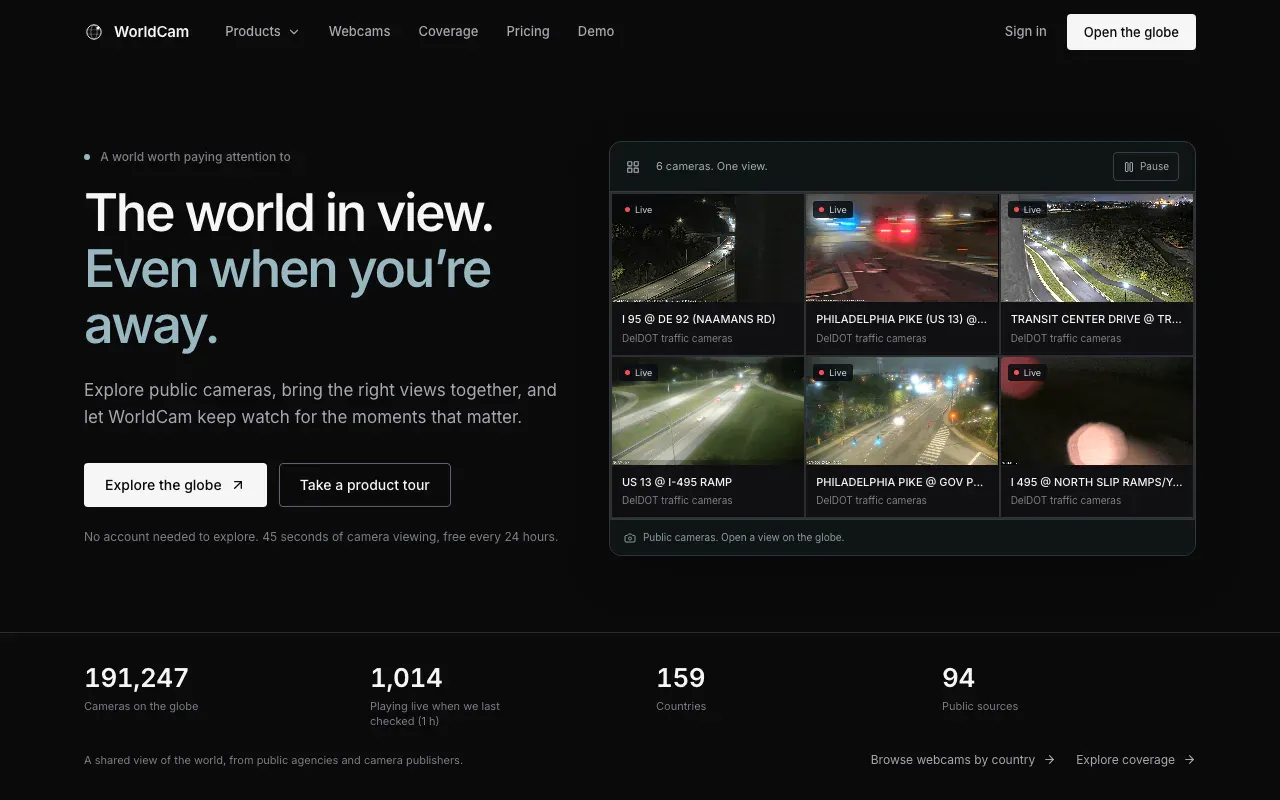
WorldCam is a 3D globe of public webcams. Traffic agencies, cities, and camera publishers put feeds online on purpose. WorldCam collects them, pins each one to its location, and credits the source. You spin to a place, open a camera, and see what is there right now.
The homepage currently counts about 190,000 cameras across 159 countries from 94 public sources. Treat that as a moving number. The coverage page is the honest version. It keeps what a publisher claims is live in one column and what WorldCam’s own checker actually reached in another.
Why it is a Gem
Finding a camera near an event is normally a tab problem. One state DOT portal, one city open-data page, one webcam aggregator with a broken player, and a search engine query for the rest. WorldCam turns that into a map search. The cameras are already placed, so the question becomes “what can see this intersection” instead of “who publishes cameras in this county.”
The paid part is what makes it a work tool. Browsing the map, search, and thumbnail previews are free with no account. Opened cameras are capped at 45 seconds every 24 hours, which is enough to check that a feed is real and not much more. Operator is $24 a month for unlimited watch time, four feeds at once, cases, and aircraft tracking. Command is $99 a month for twelve feeds, five recording cameras sharing 25 GB, and one background monitor. Enterprise is custom and is the only plan with API access and team seats.
Recording is the reason I would pay for Command. A public camera does not keep history for you. If something is about to happen in view of one, the footage exists only if somebody saved it. WorldCam records on its server after you close the tab and lets you scrub back to a time and download it.
What you can run
Camera walls put several feeds on one screen. Cases hold cameras, aircraft, and notes for one place or one job, and open as a wall in a click. Signals layers add hazards, earthquakes, fires, aircraft, satellites, and infrastructure to the same map, so a reported event sits next to the cameras that might show it.
AI monitoring watches one camera for a vehicle type and optional colour, or for people, boats, and some animals. Possible matches wait on a dashboard for 48 hours. They are called possible matches because that is what they are. Sampling, glare, and a bad source will all produce misses and wrong hits.
Limits
It does not identify anyone. There is no face recognition and no plate reading, and the acceptable use policy bans watching specific individuals or pairing the feeds with tools that do either. That is the right line for a product built on public cameras.
Recording starts when you turn it on. It cannot recover earlier footage, source outages leave gaps, and some embedded players cannot be recorded at all. Coverage follows whoever publishes cameras, so it is dense along highways in some countries and empty in others.
When I use it
When a claim is tied to a place and a time. Weather, traffic, smoke, a crowd, whether a road is actually closed. I open the nearest cameras before I trust a photo of the same scene. For anything still unfolding I start a recording first and look second.